Markdown notes at the speed of thought.

A tiny, beautifully crafted notebook for macOS, Windows and Linux. It opens in a blink, works offline, and syncs across your devices — real Markdown, built for you and for the agent working beside you.

VelocityNote
The demo has not been built for this deployment.
Run dropnote-server/build-landing.sh before deploying.
Tiny — a native install, not a bundled browser macOS · Windows · Linux Cloud sync across your devices MCP server built in

Fast, and tiny.

A native app, not a bundled browser. There is no splash screen to sit through, no renderer process, and no 400 MB of Chromium under your notes.

  • Rust and SQLite underneath; the whole install is smaller than most apps' updater
  • Search answers as you type, over the full text of every note
  • Opens on a laptop with no network, on a plane, on battery
TablesTask listsFootnotes LaTeXMathFlowcharts Code highlightingImages & attachments
VelocityNote 34 MB
Inkdrop 262 MB
Notion 285 MB
Obsidian 441 MB

Installed application size on macOS (Apple Silicon), measured with du -sm /Applications/<app>.app · August 2026. The three others are Electron apps.

VelocityNote 0.4 s
Obsidian 1.9 s
Inkdrop 2.6 s
Notion 3.4 s

Cold start to a window you can type in, on an Apple Silicon Mac. Indicative figures — a native binary opens before a bundled browser has booted.

VelocityNote 9 ms
Inkdrop 90 ms
Obsidian 180 ms
Notion 600 ms

Keystroke to results across a 10,000-note vault. Indicative figures — VelocityNote queries SQLite's FTS5 index inside the vault file, updated in the same write as the note, so nothing is rebuilt when the app opens and nothing is fetched over the network.

A notebook built with agentic programming in mind.

Turn on agent access in Preferences, paste one line into your agent, and VelocityNote becomes a place it can work: typed tools to search, read, write, file and link — no plugin, no scraping, nothing left running in the background.

  • Thirty-odd tools, grouped the way you would expect: read, write, organise
  • It writes the Markdown VelocityNote renders — tables, flowcharts, math, task lists
  • It finds things the way you do: full text, tags, titles and links. No index to rebuild
  • Everything it writes is an ordinary note, tagged ai_notes, yours to edit
What an agent can do here one registry · every client

Every one of them talks to the same vault, through the same registry — nothing to install per client, nothing left running.

and from your own shell
$ vn search "storage quota" --limit 3
  Storage quota review          Work            2d
  Standup — 14 Aug              Work/Standups   4d
  Ops budget                    Work            3w
$ vn context "ship the 1.2 launch" --budget 2000 | pbcopy
  6 sources · 1,842 tokens

Voice notes, and local LLM transcription.

Hit record and speak. Transcription runs on your machine — the audio never leaves the computer, and it works on a plane.

  • Transcribes live, into the note, at the cursor — not after you stop
  • The recording is written to disk as it is captured and flushed every second, so a crash costs the last second and nothing more
  • Recordings become attachments beside the note, so audio and transcript stay together

Desktop only — today that means macOS and Windows.
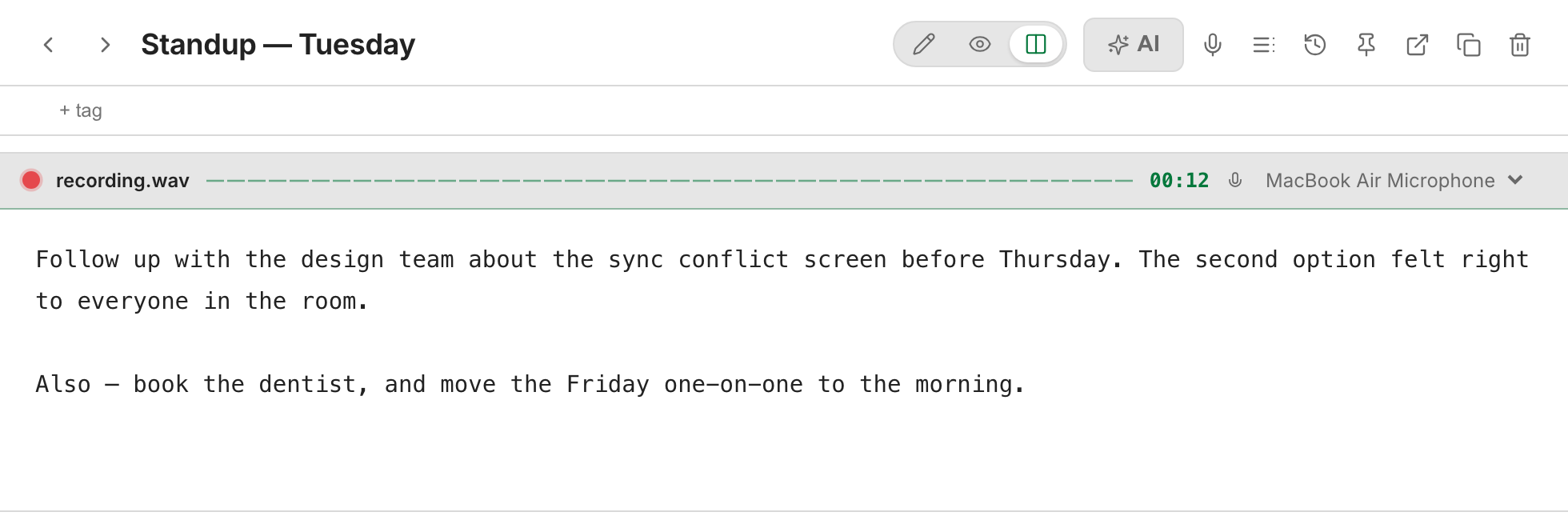
VelocityNote recording: the recording bar with a live timer and microphone picker, and the dictated sentences already written into the note

Velocity mode.

One key for everything. P searches every note as you type, previews what it finds, and — when nothing matches — makes the note you just described.

  • Titles first, then full text, ranked as you type
  • Scope it: > commands · b notebooks · t tags · # this note's outline
  • on no match creates that note; creates one any time

Inspired by Notational Velocity — one field that searches and creates, and never asks you which of the two you meant.

VelocityNote
storage quota ⌘↵ new
Storage quota reviewWork
Standup — 14 AugWork / Standups
Ops budgetWork
+Create “storage quota”
Search…> commandsb notebookt tag# outline

Your agent writes straight into your notes.

Not a chat window that forgets. Ask in plain words and the note appears in your vault — filed, tagged ai_notes, and yours to edit like any other. The same door lets it read back what you already wrote.

claude — velocitynote
 write up this standup thread — decisions on top, follow-ups as tasks → Work / Standups
search_notes(q: "standup rollout")
  ⎿ read 3 notes it should link to
create_notes(book: "Work / Standups")
Standup — 14 Aug · tagged ai_notes · 2 links

 add what we agreed after lunch
patch_note(append)
+2 lines · same note
VelocityNote

Standup — 14 Aug

Work / Standups# ai_notes14 Aug 2026
Decisions
  • Ship the follower fix behind a flag; rollout Monday — see [[Launch checklist]]
Follow-ups
  • Post the incident summary
  • Write the rollback note
  • Confirm the storage quota with ops
Launch checklist

Blocked on [[Storage quota review]], decided in [[Standup — 14 Aug]].

It links instead of repeating Ask for a summary and you get [[wiki]] links into the notes you already wrote — and the backlinks appear on the other side. The agent reads that graph too: get_backlinks, get_links.
Release 1.2 — plan
StageOwnerDay
CanaryopsMon
FullopsWed

p95 < 200 ms, so n ≈ ⌈λ·t⌉ = 12

It writes the Markdown this app renders Tables, task lists, flowcharts and LaTeX come out as the real thing, not as a code block someone has to fix. The rules it follows ship with the app — get_authoring_guide.
claude — velocitynote
 did we ever write down the rollback steps?
search_notes(q: "rollback")
  ⎿ 21 matches · 6 notes
grep_notes(pattern: "step \d")
  ⎿ 2 notes

  Yes — Rollback plan (3 Jul), steps 1-4.
  Nothing found is nothing claimed.
It reads what you already wrote Full-text search across every note, plus regex, tags, titles and recency. Six years of notes are a source it can cite, not a folder you paste from.

Notes an agent writes are ordinary notes, yours to edit. Agent access is a switch you turn on, the endpoint is on loopback, and nothing reaches it without the token.

Import all your notes within minutes.

Whatever you have been writing in, and whatever shape it is in, it ends up here — with its dates, its images and its folders intact. Re-running an import updates those notes instead of duplicating them.

Markdown folders and Obsidian vaults are read directly by the app. Everything else — Notion, Word, PDF, Evernote — an agent converts into that same folder format first, and you approve a preview before a single note is written.

Your notes, on every device you own.

Local first, synced second. The vault lives on your disk and opens with the network off — turn sync on and every device you sign in to converges on the same notes, notebooks, tags and attachments, usually within seconds.

  • Write on a plane. The moment you are back, the changes go up and everyone else's come down
  • Two devices editing the same note are merged, not overwritten — and anything that genuinely cannot merge is kept and shown to you, never resolved behind your back
  • Images and recordings travel with the notes, not as broken links
  • Sign in on any machine and open the full app in the browser — nothing to install

Sync is the one thing you pay for. Everything else on this page works on the free tier, offline, forever.

🖥
Macsynced
📱
iPhonesynced
🌐
Browsersynced
VelocityNote — Preferences
Sync

Your notes stay on this disk. Sync keeps the other devices in step.

Sync my notes
StatusUp to date · 2 s ago
This vault2,184 notes · 575 MB attachments
Devices signed in3
Unresolved conflictsnone
VelocityNoteCloud Sync
Obsidian SyncStandard · about $4 a month
EvernotePersonal · about $15 a month
Storage for attachments
50 GB
10 GB
10 GB of uploads a month
Largest single file
300 MB — a long recording, a scanned book
5 MB
200 MB per note
Largest single note
1 MB of text — roughly a 150,000-word note
No stated limit
Counted against the note's 200 MB

Ours are the limits written in the source (sync.rs, blobs.rs), not a marketing number. Attachments live on Cloudflare R2, where storage is cheap and egress is free — which is the whole reason we can hand you 50 GB and a 300 MB file at a quarter of the price. Other apps' figures are their published plan limits in August 2026; check theirs before you take ours for it.

Why VelocityNote.

There are a lot of Markdown notebooks. Four things make this one different, and all four are visible in the app on the first day, not on a roadmap.

Agent-native, not agent-added

The MCP server and the vn CLI are the app, not plugins bolted to it. An agent searches, reads, writes, files and links through typed tools, and what it writes is an ordinary note you can edit. Nothing to install per client, nothing left running in the background.

SQLite underneath, so it is quick

Notes live in a real database with a full-text index in the same file, written in the same transaction as the note. Search answers as you type over the whole vault, and there is no index to rebuild when the app opens — the thing an editor that scans a folder of files has to do every launch.

Everything is already in the box

Tables, task lists, footnotes, LaTeX, flowcharts, wiki links and backlinks, local voice transcription, import, sync, the command palette — all built in and all supported together. No plugin directory to browse, nothing to keep updated, and no morning where an update breaks the six add-ons your notes depended on.

The notes stay yours

They are Markdown, in a folder you own, on a disk you control, and the app opens them with the network off. Export writes the same format the importer reads, so leaving is a folder of .md files with your images beside them — not a support ticket, and not a plan you have to keep paying to read your own writing.

Plain Markdown on your own disk, an app that opens before you have let go of the keys, and an agent that can work in it. That is the whole product.

Three plans, and the free one never ends.

Buy the app once, or pay by the month for cloud sync — either way the notes are yours on your own disk. A plan that lapses drops back to Free: you keep every note you wrote and you keep writing, capped like anyone who never paid.

Free
no card, no end date
 

Everything local, up to 50 notes.

  • The whole app — editor, Markdown, search
  • Voice notes, transcribed on your machine
  • MCP server and the vn CLI
  • Up to 50 notes
  • No cloud sync
Download
Lifetime
early adopter · one payment
 

Unlimited notes, yours permanently.

  • Everything in Free, uncapped
  • Unlimited notes, forever
  • No subscription, no expiry
  • Cloud sync sold separately
Buy on your account page
Cloud Sync
early adopter · billed monthly
 

Unlimited notes, synced across every device you sign in to.

  • Everything in Lifetime, plus:
  • Sync across every device you sign in to
  • Your notes in the browser, on any machine
  • Attachments carried with the notes
Buy on your account page

These are early-adopter prices and they go up after launch — what you pay when you buy is what you keep paying. Every purchase happens on your account page, never inside the app.

Download and be writing in seconds.

A small native install, no account required. The free tier never ends.

Connect your agent

VelocityNote is the MCP server — nothing extra to install, no service to keep running. Preferences prints the line; paste it and restart your agent.

  1. Open Preferences → MCP and turn on Allow agent access
  2. Press Copy command — the address and the token are already in it
  3. Paste it into your terminal and restart your agent
  4. The tools appear under /mcp: search, read, create, patch, tag, file

Other clients (Cursor, Claude Desktop, your own script) get the same thing as JSON. The endpoint is on loopback and refuses anything without the token.

VelocityNote — Preferences
MCP — connect an AI agent

Typed tools to search, read and write your notes. Nothing to install — the endpoint is part of this app.

Allow agent access
Claude Code
claude mcp add --transport http velocitynote http://127.0.0.1:8790/mcp \ --header "Authorization: Bearer vn_7c1f…9ad2"

Other clients get the same thing as JSON.

Copy JSONCopy command

Ask your own notes

A fresh chat knows nothing about your work. Point it at the vault and it searches, reads what matched, and answers from your notes — naming them, so you can check.

  1. Connect the agent once (the step before this one)
  2. Ask in plain words — no syntax, no note ids
  3. It runs search_notes, then reads only what matched
  4. Every answer cites its notes. Nothing found is nothing claimed

Retrieval is lexical: full text, tags, titles, [[wiki]] links and recency. No embeddings, no vector database, no index to rebuild.

claude — velocitynote
 what did we decide about the storage quota?
search_notes(q: "storage quota")
  ⎿ 12 matches · 4 notes
read_notes(ids: 4)
  ⎿ 3.1k tokens

  Raise it to 2 TB, reviewed at launch (14 Aug).
  sources: Standup — 14 Aug · Launch checklist · Ops budget

Load context in one call

Say what you are working on and how many tokens you can spare. get_context returns one markdown bundle — the right notes, trimmed to fit, with their sources.

  1. Call get_context with the task and a token budget
  2. It picks by full-text match, tags, [[wiki]] links and recency
  3. You get markdown, its sources, and an estimated token count
  4. Follow the graph from there: get_backlinks, get_links, get_outline

The context lives in your vault, not in one chat history — so the next session starts where the last one left off.

claude — velocitynote
 catch up on the launch before we start
get_context(task: "ship the 1.2 launch", budget_tokens: 2000)
  ⎿ 6 sources · 1,842 tokens
context bundle · markdown
## Launch checklist
Work · updated 14 Aug
- [ ] Confirm the storage quota with ops - [x] Post the incident summary

## Standup — 14 Aug
Work / Standups · updated 14 Aug
Ship the follower fix behind a flag; rollout Monday. Quota raised to 2 TB, reviewed at launch.
sources: 6 notes · used_tokens_estimate: 1842

Import all your notes within minutes

Two paths, and which one you take depends only on what you already have. Both show you a preview first — nothing is written until you approve it.

Already Markdown? Do it yourself

  1. Open Preferences → Import, choose Markdown folder or Obsidian vault
  2. Pick the folder and the notebook it lands in
  3. Read the plan — nothing is written yet — then press Import

Anything else? The agent converts it

  1. Point your agent at the folder or the export file
  2. It converts to Markdown — original dates, images and folders survive
  3. It runs import_folder as a dry run and shows you the count
  4. You say yes. Re-runs update those notes instead of duplicating them

Notion, Word, PDF, Evernote and the rest are converted into the same Markdown folder format the app reads natively — one importer, one format, no second path.

VelocityNote — Preferences
Import from
Markdown folderAny folder of .md files
Obsidian vaultWiki-links and attachments
Keep the folder structure
Import intoImported ▾
Ready to import
340notes
12notebooks
87images

All 340 are new. Re-importing later updates them instead of duplicating.

BackImport 340 notes
claude — velocitynote
 import ~/Documents/Reports (word + pdf) and this evernote .enex — keep the dates
convert → ~/tmp/import-staging
  ⎿ 314 notes · 41 images · original dates kept
import_folder(dry_run: true)
  ⎿ 314 notes · 24 notebooks · create 314 · update 0
     warn: 6 .xlsx are not notes — skipped

 yes
import_folder(digest: "4b80…7e")
created 314 · updated 0 · failed 0

What each plan includes

Every row is a capability of the app itself, not a usage allowance. The only things a plan changes are the note cap and cloud sync.

What you get
Free
Lifetime
Cloud Sync
Notes you can create
50
unlimited
unlimited
The editor, Markdown and searchTables, math, flowcharts, links and images
Velocity modeOne key to search every note, jump to it, or create it
Voice notesTranscribed on your machine · macOS and Windows
MCP server and the vn CLIAgents read and write your vault, and so can you
ImportMarkdown and Obsidian directly; anything else via an agent
Cloud sync across devicesNotes, notebooks, tags and attachments
Your notes in a browserThe full app, at this address

Sign in

Sync your notes across devices, and open them in this browser. Access is invite-only.

The app itself works signed out — sign-in is for cloud sync and the browser app, nothing else.